Posts Tagged ‘Android’

Har din Google Navigator slutat fungera?

Monday, February 6th, 2012

Den senaste uppdateringen till Android Ice Cream Sandwich 4.0.2 i kombination med senaste maps medförde också att många fick problem med Google Navigate.

Anledningen är en uppdatering av Android TTS (Text To Speech) och om man går in i menyn i telefonen och återställer språket till Engelska i stället för Spanska så fungerar det utmärkt igen.

Inställningar -> Språk och inmatning -> Test-till-tal-utdata

Tryck på inställningsknappen bredvid “Google TTS Engine”, välj sedan “språk” och till sist “Engelska (USA)”.

Nu fungerar Google Navigate utmärkt igen.

The Perfect To-Do App

Monday, September 26th, 2011

Do it (Tomorrow) Web version

I have for a long time looked for the perfect To-Do application. I have looked at very complex software on the Android platform such as Astrid, I have looked at some of the more simple ones such as Taskos but I have in time stopped using them one by one.

The reason is that they are not working with me, they are working against me. I used to love Remember The Milk but when I got the smartphone app it started dwindle. It just gets too fiddlesome and after a while I stop maintaining the database and then I might just as well do with good old pen and paper.

Until a couple of weeks ago when I found the perfect to-do manager that works as my brain works. I have now tried it out for a while and I am really happy with it. So happy I want to share my joy with you!

I have tried to follow the Getting Things Done scheme of things, different focus and various perspectives, never felt very natural to me. I have a more geometric kind of memory, i have no problem remembering numbers, figures and symbols, I also know roughly in which pile I have put something. Even if my home folder looks disorganised I know how to find my stuff pretty quickly. But the Getting Things Done (GTD) scheme just clashes with my frontal neo-cortex somewhere.

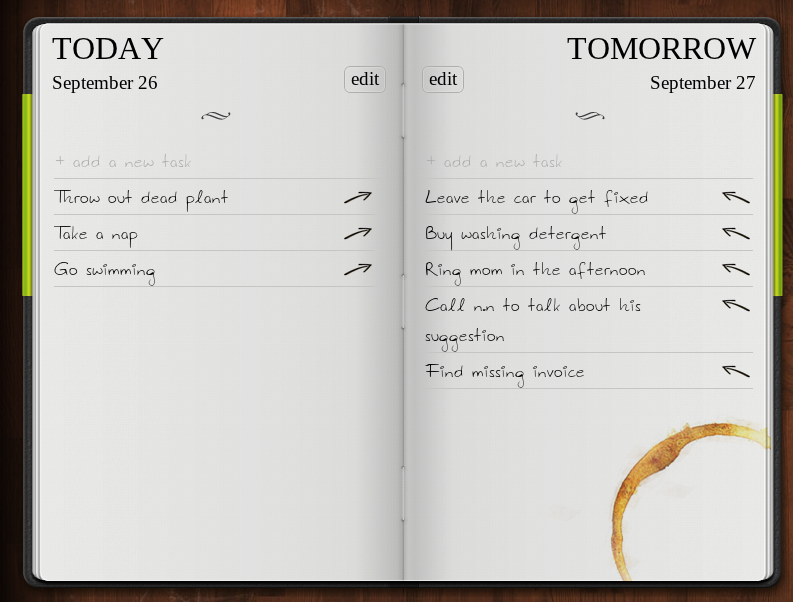
Enter the fantastic “Do it (Tomorrow)”. It’s so simple it is brilliant. You have a notebook like app in your phone (and on the web) which has two pages. It has a page for TODAY and a page for TOMORROW. Everything you want to do today you put on the TODAY page and everything else on the TOMORROW.

Every morning all tasks ends up on your TODAY page and you quickly dismiss all you can not do today, all you do not want to do today, and those that you think you won’t have time for by pressing the right hand arrow and they just whiff off to the TOMORROW page. What is left is your todays task list.

As the day progresses you probably find new stuff you need to add. Make a decision, either put it on todays list if you seriously think you will handle it today or put it on the TOMORROW page if you want to do it tomorrow (or later).

It wors brilliant because this is exactly how my brain organises tasks naturally. It has pretty much two compartments for not finished tasks and they are “now” and “later” which corresponds pretty well to the TODAY and TOMORROW pages.

I have also realised I put far too many tasks in the GTD schemes and similar, it’s no use. Things that ought to be completed in november should not be in your task book in June. Just let it mature for a while. Maybe in October it is a candidate. But keep it simple, that really works – for me at least.

The android, iPhone and web versions can be synced. Just input your email address and a password of your choosing (does not have to be the same as your webmail password mind you) then it will synchronize automatically across platforms.

On the smartphone app you switch between TODAY and TOMORROW by swiping. Moving a task from one page to the other is done by touching the arrow pointing to the opposite side. You can also arrange the order and delete them completely, just touch the EDIT button first and you will see how you accomplis that.

To tick of a task when it is done, simply touch it. A pencil-line crosses it out and you are done. The next morning it is gone if you ticked it done on the TODAY page, if you ticked it on the TOMORROW page it will be moved, already ticked off, to your TODAY page and sit there for a day. Quite simple.

Find their home page now or if you have an Android phone you can download it form Market immediately. iPhone users find it in the app store or from the home page on the web first.

Google Navigation nu i Sverige

Wednesday, August 10th, 2011

Äntligen har Google Navigation släppts för bl.a. Sverige! Många har vi varit som har väntat på detta och nu fungerar det äntligen. Jag blev så glad när jag upptäckte detta i går kväll att jag tom tog bilen till jobbet för att testa den ordentligt.

Den fungerade mycket bra. Den har kanske inte alla finesser hos alla betalapparna men den gör det den skall väldigt bra. Navigationen är mycket smidig och det är lätt att hitta alternativa vägar om man vill jämföra lite olika vägar till sitt mål. Den är väldigt snabb på att räkna om rutten ifall man väljer att köra en annan väg än den föreslagna (läs: kör fel) och jag är väldigt väldigt nöjd med den.

Jag har tidigare testat ett antal olika navigationsappar för Android men de flesta har fallit på antingen orimligt pris (ofta får man en 30 dagars prövotid eller liknande) eller så har de helt enkelt fungerat rätt dåligt. En som har fungerat bra för mig är annars NDrive men jag kommer nog inte nyttja den jättemycket nu när Navigate fungerar så bra.

Jag har inte hittat fartkameradata och liknande till den ännu men skall undersöka vilka add-ons som finns där ute.

Connect those androids

Tuesday, May 10th, 2011

This is so cool it is almost insane! And this will definitely increase the usefulness of an already extremely useful device beyond what anyone can dream of today.

Android 3.1 SDK new Open Accessory API

The new Android API, primarily for tablets (let’s hope it will be used on smartphone devices soon as well) means it will be much simpler for hardware manufacturers to connect peripherals to your Android device.

The API allows any device with host USB functionality to connect to a multitude of USB devices and interact with many different kinds of devices from music devices, exercise equipment, input devices such as joysticks, standard USB keyboard… you can almost find no end to the stuff that you could potenmtially hook up to your android.

Lovely.

Android runner app: iMapMyRun

Sunday, April 24th, 2011

I was prompted on Twitter to test out the Android mobile app “iMapMyRun” and so I did today. My first impression was that the software is not there yet, it has not reached a mature enough state to seriously compete with BuddyRunner or Endomondo or CardioTrainer or to be used even for beginners.

When registering I got buttons to select imperial/european units but none of the buttons seemed to work when I pressed them and in the end I had to chose to move on. When I did so I could not find another way to go back and change the settings, nor could I update my personal data such as weight and so on.

Today I took it for a test run and I used other tracking software at the same time. After about 2/3 of the way the iMapMyRun software stopped recording it seems and instead it just plotted the last position when I turned it off at my finish. Therefore it just went in a straight line for the last 1/3 of the run. Definitely something fishy was going on there. Neither did it record the GPS elevation data for some reason, the accompanying web site says “There was an error retrieving the elevation”, I have no idea why. Of my 5 km run this app recorded only 3.

Both other recording apps (Google Tracks and Endomondo) worked fine through all this. On top of all that it feels unintuitive and quirky and a little backwards but that may be just me expecting things from being used to the other apps in this field.

When the workout finished I got a ridiculous question about peanyut butter, an ad that felt intrusive and out of place. Peanut butter is hardly the stuff for athletes so it felt rather misplaced. The whole app and the accompanying web site is riddled with ads. If you are viewing your runs, you have to upgrade to the payed version or wait 15 seconds before you can see your run. Again it is not on the level with the competing softwares in this respect.

My recommendation is to wait and see if this app matures. In the mean time check out BuddyRunner or Endomondo, both very mature and well working GPS tracking apps for runners.

It gets one running shoe out of five for now.